
What Is Arduino Uno? A Ten-Year-Old Figures It Out
RoboAiQ Editorial · Editorial Team · Published 28 May 2026
Written by RoboAiQ's editorial bench — working electronics engineers and the instructors who teach the classes.
The Blue Board With All the Pins
The kid found it in the kit. A small blue board, roughly the size of a playing card, with rows of pins along both edges and a black chip in the middle. The instruction sheet called it an Arduino Uno. The kid called it "the brain."
She was not wrong.
What Is Arduino Uno, Actually?
The Arduino Uno is a microcontroller board. "Microcontroller" sounds complicated until you split it: micro means small, controller means it controls things. The Arduino Uno is a small board that controls things.
It reads signals coming in — from buttons, sensors, switches — processes them, and sends signals back out — to LEDs, motors, buzzers, displays. Input, think, output. That is the entire job description.
What Does It Look Like? The Parts That Matter
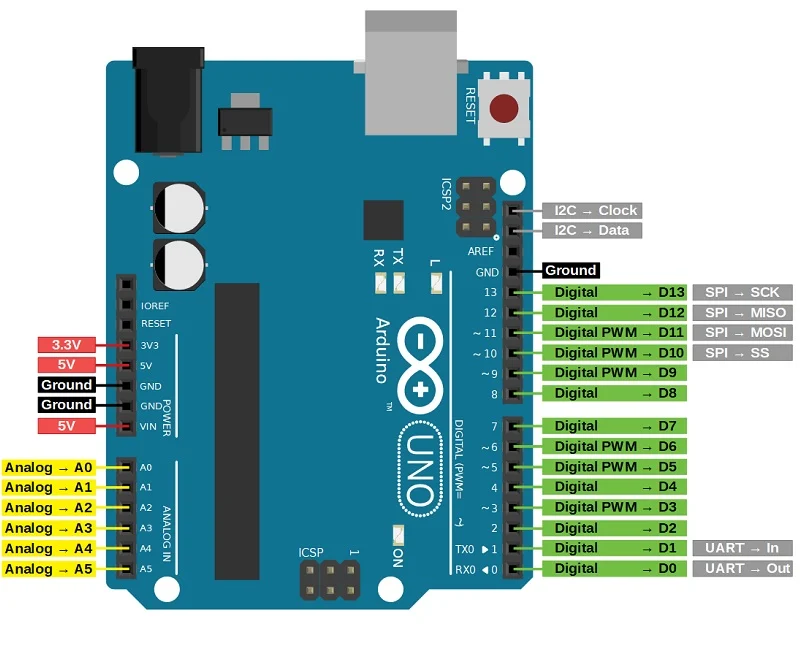
The board has six things worth knowing about:
- The USB port — how she sends her code from the laptop to the board
- The digital pins (0–13) — these read or send on/off signals
- The analog pins (A0–A5) — these read values on a scale, like how bright a light is, not just whether it's on
- The power pins — supply 5V or 3.3V to connected components
- The reset button — restarts the board from the top of the code
- The ATmega328P chip — the large black square in the middle; the part doing the actual computing
How Many Pins Does Arduino Uno Have?
The kid counted. The Arduino Uno has 14 digital input/output pins and 6 analog input pins — 20 signal pins in total. Of the 14 digital pins, 6 support PWM, which stands for pulse width modulation. PWM is how you tell a motor to go slower instead of just on or off.
Twenty pins sounds like a lot until you start wiring a robot and realise each sensor and motor needs one. Then it sounds exactly right.
What Is Arduino Uno Used For?
The short answer: almost everything in the kit.
- Making an LED blink — this is the "Hello, World" of robotics, the first build, and the kid will do it more than once
- Reading sensor values — the ultrasonic sensor says there is an obstacle 11 cm ahead; the Arduino Uno gets that number and decides what to do
- Driving motors — through a motor driver, the board tells the wheels to go forward, turn, or stop
- Controlling servo motors — the arm rotates to exactly 90 degrees because the board sent that instruction
- Running the whole robot — when all of the above happen at once, that is the Arduino Uno doing its job
How Does the Kid Actually Talk to It?
She writes code on her laptop using a free programme called the Arduino IDE. The IDE is where she types her instructions. When she clicks Upload, the code travels through the USB cable and lives on the board. The board runs that code on a loop — without needing the laptop anymore.
This is the part that surprised her. She unplugged the cable, powered the board from the battery pack, and the robot still worked. It was running her instructions. She was not present. The robot was doing it alone.
What Happens When Something Goes Wrong?
The kid presses the reset button. The board restarts from the top of the code. If the code itself has a bug, she fixes it on the laptop and uploads again.
She once spent twenty minutes wondering why her buzzer was playing notes in the wrong order. The bug was a single misplaced comma. One character. Twenty minutes. She found it. She checks the commas first now.
Arduino Uno vs ESP32 — The Short Version
The kit also includes an ESP32. The ESP32 is faster and has built-in Wi-Fi. The Arduino Uno is simpler and more forgiving for a first build.
The kid's mentor put it this way: the Arduino Uno is the car she learns to drive on. The ESP32 is the car she drives once she stops treating the clutch like a suggestion.
The Part That Actually Matters
None of the above — the pins, the chip, the PWM — matters more than the first moment the code works and the LED blinks on command.
The kid had typed the instruction. The board had read it. The LED had responded. Something she built, from a board and a handful of wires, had done exactly what she told it to do.
She tried changing the blink speed. Faster, then slower, then a pattern. The board followed every change.
This is what Arduino Uno is used for: the moment a ten-year-old realises the machine does what she says, and starts thinking about what she wants to say next.